SpectroCloud/VertexInstall: Difference between revisions
Jump to navigation
Jump to search
| (29 intermediate revisions by the same user not shown) | |||
| Line 3: | Line 3: | ||
===Pre Requisites=== | ===Pre Requisites=== | ||
====1. Needed Downloads==== | ====1. Needed Downloads==== | ||
* RETOOL Location: Palette-Release -> Vertex Info -> Binaries | * RETOOL Location: Palette-Release -> Vertex Info -> Binaries | ||
Release Binary | Airgap Binaries: Release Binary | ||
Palette CLI Linux | Command Line Tools: Palette CLI Linux | ||
* RETOOL Location: Palette-Release -> Vertex Info -> Capi OS Images | * RETOOL Location: Palette-Release -> Vertex Info -> Capi OS Images | ||
Search: "<supported version #>" | Search: "<supported version #>" | ||
| Line 36: | Line 31: | ||
** Convert VM to Template. | ** Convert VM to Template. | ||
==== | ====3. Jumpbox Setup==== | ||
<!-- | <!-- | ||
DOCS REFERENCE: https://docs.spectrocloud.com/vertex/install-palette-vertex/install-on-vmware/airgap-install/environment-setup/vmware-vsphere-airgap-instructions/ | DOCS REFERENCE: https://docs.spectrocloud.com/vertex/install-palette-vertex/install-on-vmware/airgap-install/environment-setup/vmware-vsphere-airgap-instructions/ | ||
| Line 56: | Line 51: | ||
sudo --login | sudo --login | ||
--> | --> | ||
############################# | ############################# | ||
# Install Required Software # | # Install Required Software # | ||
| Line 71: | Line 56: | ||
apt update | apt update | ||
apt upgrade -y | apt upgrade -y | ||
apt-get -y install snapd unzip nfs-common ca-certificates | apt-get -y install snapd unzip nfs-common ca-certificates zip | ||
snap install oras --classic | snap install oras --classic | ||
| Line 78: | Line 63: | ||
################################################## | ################################################## | ||
docker login harbor.dersllc.com -u admin -p '<Password>' | docker login harbor.dersllc.com -u admin -p '<Password>' | ||
oras login harbor.dersllc.com --username 'admin' --password '<Password>' | oras login harbor.dersllc.com --username 'admin' --password '<Password>' | ||
################################## | <!--oras push $OCI_PACK_REGISTRY/$OCI_PACK_BASE/spectro-manifests/manifest:$SC_VERSION manifests.tgz --insecure --annotation org.opencontainers.image.created="2023-07-24T11:57:56Z"--> | ||
# Setup NFS Mount (NOT REQUIRED) # | ##################################################### | ||
################################## | # Setup NFS Mount (NOT REQUIRED, DERS LAB SPECIFIC) # | ||
##################################################### | |||
mkdir -p /opt/spectro/ssl/ | mkdir -p /opt/spectro/ssl/ | ||
curl --insecure https://ders-gitlab.dersllc.com/ders/ders-proxy/-/raw/master/STAR_dersllc_com.crt > /opt/spectro/ssl/server.crt | curl --insecure https://ders-gitlab.dersllc.com/ders/ders-proxy/-/raw/master/STAR_dersllc_com.crt > /opt/spectro/ssl/server.crt | ||
| Line 93: | Line 79: | ||
mount -a | mount -a | ||
#################### | ###################################################### | ||
# Trust DERS Certs # | # Trust DERS Certs (NOT REQUIRED, DERS LAB SPECIFIC) # | ||
#################### | ###################################################### | ||
curl --insecure https://ders-gitlab.dersllc.com/ders/ders-proxy/-/raw/master/AddTrustExternalCARoot.crt > /usr/local/share/ca-certificates/ders-star-ca.crt | curl --insecure https://ders-gitlab.dersllc.com/ders/ders-proxy/-/raw/master/AddTrustExternalCARoot.crt > /usr/local/share/ca-certificates/ders-star-ca.crt | ||
curl --insecure https://ders-gitlab.dersllc.com/ders/vmware-se/-/raw/main/HomeLab/DERS-CA-CERT/ders-ca.cer > /usr/local/share/ca-certificates/ders-ssca.crt | curl --insecure https://ders-gitlab.dersllc.com/ders/vmware-se/-/raw/main/HomeLab/DERS-CA-CERT/ders-ca.cer > /usr/local/share/ca-certificates/ders-ssca.crt | ||
update-ca-certificates | update-ca-certificates | ||
<!-- | <!-- | ||
| Line 149: | Line 116: | ||
===Vertex Install Steps=== | ===Vertex Install Steps=== | ||
################# | |||
# SET VARIABLES # | |||
################# | |||
export OCI_IMAGE_REGISTRY=harbor.dersllc.com | |||
export OCI_IMAGE_BASE=airgap-spectro-images | |||
export OCI_PACK_REGISTRY=harbor.dersllc.com | |||
export OCI_PACK_BASE=airgap-spectro-packs | |||
export SC_VERSION='4.6.18' | |||
################################# | |||
# Import Containers into Harbor # | |||
################################# | |||
chmod +x /nfs/Download/airgap-vertex-* | |||
/nfs/Download/airgap-vertex-v$SC_VERSION.bin --nodiskspace --target /nfs/Download/airgap-vertex-v$SC_VERSION/ | |||
####################### | |||
# Install Palette CLI # | |||
####################### | |||
<!-- source /nfs/Download/airgap-vertex-v$SC_VERSION/bin/functions.sh; cli_copy --> | |||
mv /nfs/Download/palette /usr/local/bin/palette | |||
chmod +x /usr/local/bin/palette | |||
# Encryption | |||
export PALETTE_ENCRYPTION_PASSWORD='VERTEX1234!vertex1234!' | |||
# SSH to sc-deploy and run: | # SSH to sc-deploy and run: | ||
palette version | |||
#Note: make sure it is at least 4.5.7 | |||
palette ec install | palette ec install | ||
| Line 163: | Line 158: | ||
# Cloud Type: | # Cloud Type: | ||
<strong> VMware vSphere </strong> | <strong> VMware vSphere </strong> | ||
<!-- | |||
########################################################## | ########################################################## | ||
# Spectro Cloud Artifact Repository (SCAR) Configuration # | # Spectro Cloud Artifact Repository (SCAR) Configuration # | ||
| Line 174: | Line 170: | ||
# Allow Insecure Connection (Bypass x509 Verification)? [Y/n]: | # Allow Insecure Connection (Bypass x509 Verification)? [Y/n]: | ||
<strong> Yes </strong> | <strong> Yes </strong> | ||
--> | |||
################################### | ################################### | ||
# Enter Environment Configuration # | # Enter Environment Configuration # | ||
| Line 181: | Line 178: | ||
# Pod CIDR: 192.168.0.0/16 | # Pod CIDR: 192.168.0.0/16 | ||
# Service IP Range: 10.96.0.0/12 | # Service IP Range: 10.96.0.0/12 | ||
############################################# | ############################################# | ||
# Enter Pack & Image Registry Configuration # | # Enter Pack & Image Registry Configuration # | ||
| Line 193: | Line 184: | ||
<strong> OCI </strong> | <strong> OCI </strong> | ||
# Registry Name: | # Registry Name: | ||
<strong> | <strong> DERS-Harbor </strong> | ||
# Registry Endpoint: | # Registry Endpoint: | ||
<strong>https://harbor.dersllc.com </strong> | <strong>https://harbor.dersllc.com </strong> | ||
# Registry Base Content Path (optional, hit enter to skip): | # Registry Base Content Path (optional, hit enter to skip): | ||
<strong>spectro-images</strong> | <strong>airgap-spectro-images</strong> | ||
# | # Registry CA certificate Filepath (optional, hit enter to skip): | ||
<strong> | <strong>/usr/local/share/ca-certificates/ders-star-ca.crt</strong> | ||
# Registry Username (optional, hit enter to skip): | # Registry Username (optional, hit enter to skip): | ||
<strong>admin</strong> | <strong>admin</strong> | ||
| Line 210: | Line 201: | ||
<strong>Yes</strong> | <strong>Yes</strong> | ||
# Registry Base Content Path (optional, hit enter to skip): | # Registry Base Content Path (optional, hit enter to skip): | ||
<strong>spectro- | <strong>airgap-spectro-packs</strong> | ||
####################### | |||
# Collecting Metadata # | |||
####################### | |||
# Kind Cluster Name: | |||
<strong> spectro-mgmt-cluster </strong> | |||
##################################### | ##################################### | ||
# Enter vSphere Account Information # | # Enter vSphere Account Information # | ||
| Line 267: | Line 263: | ||
# Node Affinity: Enter 'y' to schedule all Palette pods on control plane nodes? [y/N]: | # Node Affinity: Enter 'y' to schedule all Palette pods on control plane nodes? [y/N]: | ||
<strong>No</strong> | <strong>No</strong> | ||
===Possible Install Help=== | |||
# add-on deployment not finishing | |||
Restart the cluster-management-agent | |||
===Vertex UI=== | ===Vertex UI=== | ||
https://vertex.dersllc.com/system | https://ders-vertex.dersllc.com/system | ||
==Troubleshooting== | ==Troubleshooting== | ||
| Line 288: | Line 288: | ||
Enable "Allow non-FIPS packs" | Enable "Allow non-FIPS packs" | ||
Enable "Allow non-FIPS features" | Enable "Allow non-FIPS features" | ||
=== ORAS Pull and Push === | |||
oras login harbor.dersllc.com --username 'admin' --password '<password>' | |||
oras pull harbor.dersllc.com/vertex-fips/rc-fips/4.5/spectro-packs/archive/ubuntu-maas:20.04 | |||
oras push harbor.dersllc.com/spectro-packs/spectro-packs/archive/ubuntu-maas:20.04 ubuntu-maas-20.04.tar.gz --insecure --annotation org.opencontainers.image.created="2023-07-24T11:57:56Z" | |||
* ??Download Certs | * ??Download Certs | ||
curl --insecure https://ders-gitlab.dersllc.com/ders/ders-proxy/-/raw/master/STAR_dersllc_com.crt > /opt/spectro/ssl/server.crt | curl --insecure https://ders-gitlab.dersllc.com/ders/ders-proxy/-/raw/master/STAR_dersllc_com.crt > /opt/spectro/ssl/server.crt | ||
curl --insecure https://ders-gitlab.dersllc.com/ders/ders-proxy/-/raw/master/dersllc-new.key > /opt/spectro/ssl/server.key | curl --insecure https://ders-gitlab.dersllc.com/ders/ders-proxy/-/raw/master/dersllc-new.key > /opt/spectro/ssl/server.key | ||
Latest revision as of 17:33, 10 April 2025
Vertex Installation Instructions
Vertex Installation
Pre Requisites
1. Needed Downloads
- RETOOL Location: Palette-Release -> Vertex Info -> Binaries
Airgap Binaries: Release Binary
Command Line Tools: Palette CLI Linux
- RETOOL Location: Palette-Release -> Vertex Info -> Capi OS Images
Search: "<supported version #>"
Download: k8s_fips for vmware
NOTE: find supported versions via https://docs.spectrocloud.com/release-notes/
- RETOOL Location: Palette-Release -> Vertex Info -> Airgap Binaries
Search: "airgap-vertex-pack-kubernetes"
Download:  kubernetes  for <supported version>
NOTE: find supported versions via https://docs.spectrocloud.com/release-notes/
2. vCenter Prep
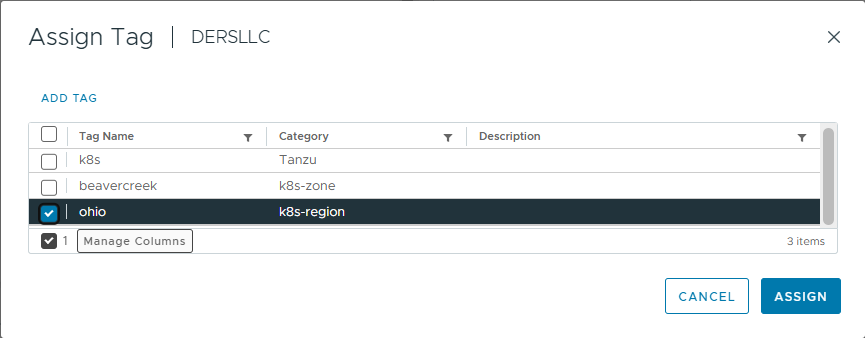
- Tag the DataCenter with k8s-region

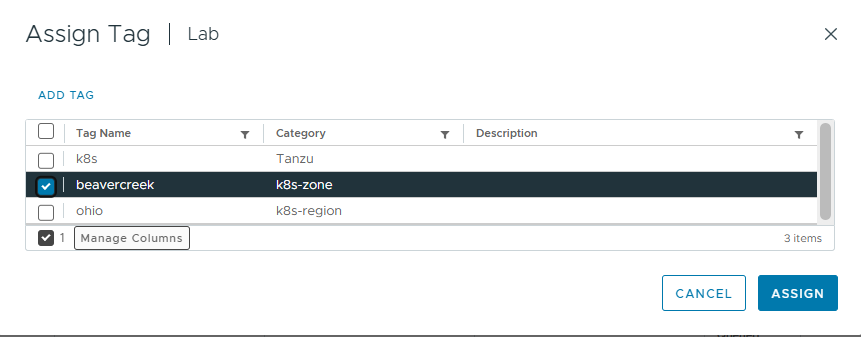
- Tag the Cluster with k8s-zone

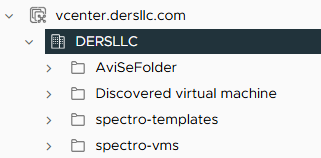
- Create a VM Folder called spectro-templates
- Create a VM Folder called spectro-vms

- Import the k8s_fips OVA (ex. u-2004-0-k-1305-fips.ova)
- Rename Image to "r_u-2004-0-k-<version>-fips" (ex. r_u-2004-0-k-1305-fips)
- Convert VM to Template.
3. Jumpbox Setup
#############################
# Install Required Software #
#############################
apt update
apt upgrade -y
apt-get -y install snapd unzip nfs-common ca-certificates zip
snap install oras --classic

##################################################
# Log-in via Docker and ORAS and upload the SCAR #
##################################################
docker login harbor.dersllc.com -u admin -p '<Password>'

oras login harbor.dersllc.com --username 'admin' --password '<Password>'

#####################################################
# Setup NFS Mount (NOT REQUIRED, DERS LAB SPECIFIC) #
#####################################################
mkdir -p /opt/spectro/ssl/
curl --insecure https://ders-gitlab.dersllc.com/ders/ders-proxy/-/raw/master/STAR_dersllc_com.crt > /opt/spectro/ssl/server.crt
curl --insecure https://ders-gitlab.dersllc.com/ders/ders-proxy/-/raw/master/dersllc-new.key > /opt/spectro/ssl/server.key
echo "172.16.85.15:/Download      /nfs/Download    nfs vers=4.0    0 0" >> /etc/fstab
mkdir -p /nfs/Download
mount -a

######################################################
# Trust DERS Certs (NOT REQUIRED, DERS LAB SPECIFIC) #
######################################################
curl --insecure https://ders-gitlab.dersllc.com/ders/ders-proxy/-/raw/master/AddTrustExternalCARoot.crt > /usr/local/share/ca-certificates/ders-star-ca.crt
curl --insecure https://ders-gitlab.dersllc.com/ders/vmware-se/-/raw/main/HomeLab/DERS-CA-CERT/ders-ca.cer > /usr/local/share/ca-certificates/ders-ssca.crt
update-ca-certificates
4. Harbor Prep
- Create a new Public Project (spectro-images)
- Create a new Public Project (spectro-packs)
Vertex Install Steps
#################
# SET VARIABLES #
#################
export OCI_IMAGE_REGISTRY=harbor.dersllc.com
export OCI_IMAGE_BASE=airgap-spectro-images
export OCI_PACK_REGISTRY=harbor.dersllc.com
export OCI_PACK_BASE=airgap-spectro-packs
export SC_VERSION='4.6.18'

#################################
# Import Containers into Harbor #
#################################
chmod +x /nfs/Download/airgap-vertex-*
/nfs/Download/airgap-vertex-v$SC_VERSION.bin --nodiskspace --target /nfs/Download/airgap-vertex-v$SC_VERSION/

#######################
# Install Palette CLI #
#######################
mv /nfs/Download/palette /usr/local/bin/palette
chmod +x /usr/local/bin/palette
# Encryption
export PALETTE_ENCRYPTION_PASSWORD='VERTEX1234!vertex1234!'

# SSH to sc-deploy and run:
palette version
#Note: make sure it is at least 4.5.7

palette ec install

# No palette CLI config file detected. One will be created.
# Management Plane Type:
     Palette VerteX
# Operating System:
     ubuntu
# Enable Ubuntu Pro (required for production)? [y/N]:  Yes
# Ubuntu Pro token:  C12HPMun5ibCKAqtW%cqBpaL66RNjd
# enabling experimental podman provider
# No kind clusters found.
# Cloud Type:
     VMware vSphere
###################################
# Enter Environment Configuration #
###################################
# HTTPS Proxy (optional, hit enter to skip):
# HTTP Proxy (optional, hit enter to skip):
# Pod CIDR: 192.168.0.0/16
# Service IP Range: 10.96.0.0/12
#############################################
# Enter Pack & Image Registry Configuration #
#############################################
# Registry Type:
     OCI
# Registry Name:
     DERS-Harbor
# Registry Endpoint:
    https://harbor.dersllc.com
# Registry Base Content Path (optional, hit enter to skip):
    airgap-spectro-images
# Registry CA certificate Filepath (optional, hit enter to skip):
    /usr/local/share/ca-certificates/ders-star-ca.crt
# Registry Username (optional, hit enter to skip):
    admin
# Registry Password (optional, hit enter to skip):
    *********
# Enter 'Y' to pull images from public registries or 'N' to specify an OCI image registry
# Pull images from public registries? [Y/n]:
    No
# Use the same OCI Registry for packs & images? [Y/n]:
    Yes
# Registry Base Content Path (optional, hit enter to skip):
    airgap-spectro-packs
#######################
# Collecting Metadata #
#######################
# Kind Cluster Name:
     spectro-mgmt-cluster
#####################################
# Enter vSphere Account Information #
#####################################
# vSphere Endpoint:
    vcenter.dersllc.com
# vSphere Username (with domain):
    [email protected]
# vSphere Password:
    *********
# Allow Insecure Connection (Bypass x509 Verification)? [Y/n]:
    Yes
##################################################
# Enter vSphere Enterprise Cluster configuration #
##################################################
# Datacenter:
    DERSLLC
# VM Folder:
    spectro-vms
# Image Template Folder:
    spectro-templates
# Cluster for Fault Domain:
    Lab
# Network:
    DERS-87
# Resource Pool:
    Default (root resource pool for cluster: Lab)
# Select specific Datastore or use a VM Storage Policy:
    Datastore
# Datastore:
    DERS-HDD
# Unable to add another Fault Domain as no Clusters remain in Datacenter DERSLLC
# NTP servers (comma-separated domain names or IP addresses, optional) (optional, hit enter to skip):
    172.16.84.21
# Configure SSH public key(s)
    ssh-rsa AAAAB3NzaC1yc2EAAAADAQABAAABAQDngCrc1Na1xES5nnSBHxw1MMcwEwFL4TpwbSTq4BlcKb4WUGE4AOXr4W4RenB6OTyLkHOeLNc2ptILF3PZQG44SZ+uZMBLhx82DYbMq75F6WDSd7wnHA0cL90ncXGoLnwk+UnNEg59zmhYbrMEVM5OS3k0Ll/EXUb9PUsE+SdEoKDG+84OiwCQnQ+DWr9R79NHwLKflOvIMtoZuFwjObQ7xbsTO27FhL8wbcUDqygVqq+6r6adyZ1yEuqhXRkzUgQWv/rIzATaLTZp5r3kCGRe+EkB6AlapwE1O139ZGuY4m/FlIeXO1Ty0mmF88dI0CsbFUJcKKnO07nzSBhQevRr
# Specify a static IP range for assigning static IPs to cluster node(s).
# The IP range must contain at least 5 IPs.
# Start IP:
    172.16.85.200
# End IP:
    172.16.85.220
# Network Prefix:
    22
# Gateway IP Address:
    172.16.84.1
# Name servers (comma-separated IP addresses):
    172.16.84.10
# Name server search suffixes (Optional) (optional, hit enter to skip):
    dersllc.com
###################################################################
#  Enter vSphere Machine configuration for the Enterprise Cluster #
###################################################################
# Select combination:
    S: 16 CPU, 32 GB memory, 60 GB storage, 20 GB database with 4 CPU limit and 8 GB memory limit
# Node Affinity: Enter 'y' to schedule all Palette pods on control plane nodes? [y/N]:
    No
Possible Install Help
# add-on deployment not finishing
Restart the cluster-management-agent
Vertex UI
https://ders-vertex.dersllc.com/system
Troubleshooting
spectro mgmt self link creation is still pending
Error:
spectro mgmt self link creation is still pending
Fix:
Restart the spectrocluster Deployment
Failed to apply cert renewal plan for first time push of certs
Error:
Failed to apply cert renewal plan for first time push of certs
Fix:
Restart the Palette-Controller-Manager Deployment
No Helm Charts Showing up in Profile creation
Error:
Helm results empty
Fix:
Navigate to "Tenant Settings" -> Platform -> Platform Settings
Enable "Allow non-FIPS packs"
Enable "Allow non-FIPS features"
ORAS Pull and Push
oras login harbor.dersllc.com --username 'admin' --password '<password>'
oras pull harbor.dersllc.com/vertex-fips/rc-fips/4.5/spectro-packs/archive/ubuntu-maas:20.04
oras push harbor.dersllc.com/spectro-packs/spectro-packs/archive/ubuntu-maas:20.04 ubuntu-maas-20.04.tar.gz --insecure --annotation org.opencontainers.image.created="2023-07-24T11:57:56Z"
- ??Download Certs
curl --insecure https://ders-gitlab.dersllc.com/ders/ders-proxy/-/raw/master/STAR_dersllc_com.crt > /opt/spectro/ssl/server.crt
curl --insecure https://ders-gitlab.dersllc.com/ders/ders-proxy/-/raw/master/dersllc-new.key > /opt/spectro/ssl/server.key